Store Audit: Creating an Audit Template
Last updated: August 25, 2026
What is an Audit Template?
Audit templates are the foundation of the Store Audit feature.
Every audit conducted in the platform is based on a template that you define.
Templates are made up of individual questions, each of which is highly configurable to suit your store standards and compliance goals.
Question Types
When building a template, you can choose from several question types to best capture the information you need:
Text Input- single or multi-line text respomses
Yes / No- for straightforward compliance checks (e.g., “Is product priced properly?”)
Scored / Rated- for questions requiring a score out of a defined range (e.g., out of 3)
Likert Scale- Agreement Scale- (e.g. strongly Agree to Strongly Disagree)
Multiple Choice- Select one or more options from a list
Ranking- Drag and drop to rank items
Photo Capture- upload photos as evidence
Date/Time- Date and time picker
Question Configuration Options
Each question in a template can be configured with the following options:
Required — the question must be answered before the audit can be submitted
Correct Answer — specify the expected correct answer to track compliance (e.g., Yes = correct)
Allow Comments — enable the auditor to leave a written note
Require Comments — make a written note mandatory for this question
Allow Attachments — enable the auditor to upload a photo or file
Require Attachments — make a photo or file upload mandatory
How to Build an Audit Template
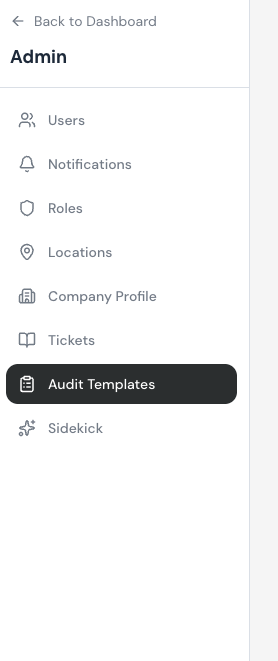
Navigate to the Admin dashboard and on the left hand side select" Audit Templates"
Open or create a template from the templates list.
Name the Audit and describe the purpose and scope of audit
Add questions by selecting a question type.
Configure each question using the available options (required, comments, attachments, correct answer).
Repeat until your template reflects all the standards you wish to evaluate.
Building an Audit Template (New in V2)
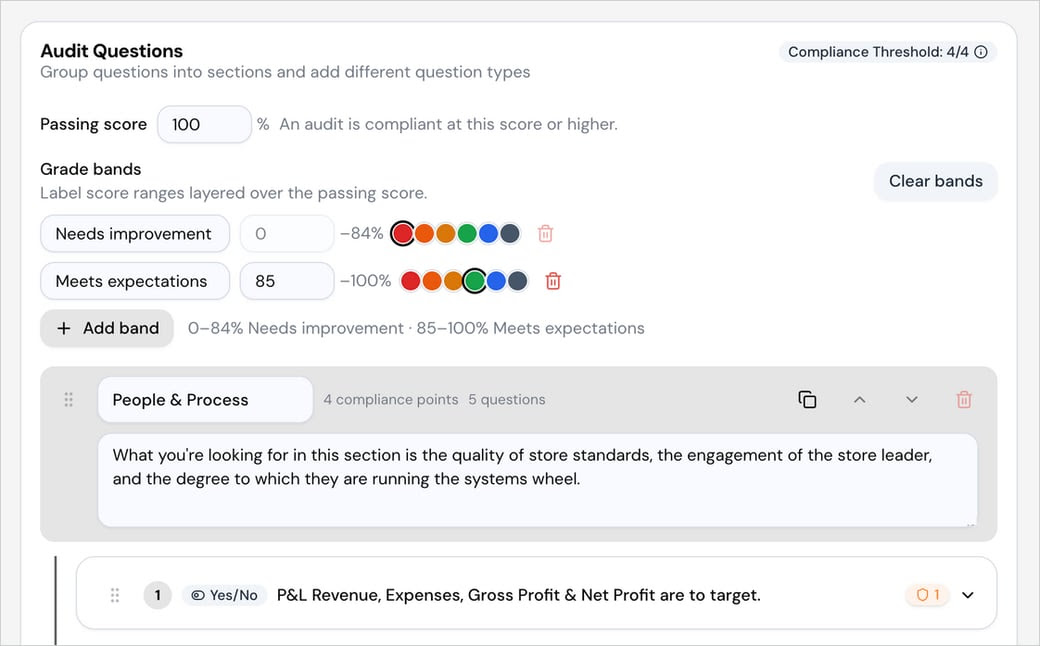
Store Audit V2 adds new template components so your audit scores itself the way your organization already evaluates performance. Group questions into Sections, then add a Section Description that tells the auditor what good looks like before they answer — it surfaces right where they need it, so two people auditing the same store reach the same conclusion. Weight individual questions with compliance points, set the passing score, and layer grade bands over it to turn a percentage into language your field team already uses.
Sections — group related questions together for a clearer walkthrough and cleaner reporting. For example, a "People & Process" section might tell the auditor what to look for — store standards, the store leader's engagement, and how well the team runs its systems — before they answer the questions in it.
Section Description — auditor guidance attached directly to a section, rather than a separate reference doc, so the standard is visible in the moment the question is being answered.
Compliance points — weight individual questions so the ones that matter most count for more toward the score, rather than every question counting equally.
Passing score — set the score an audit must meet or beat to be considered compliant (e.g., 100%).
Grade bands — label score ranges layered over the passing score, such as "Needs improvement" (0–84%) and "Meets expectations" (85–100%), so a percentage reads as language your field team already uses.