Store Audit: Reporting and Analytics
Last updated: August 20, 2026
Overview
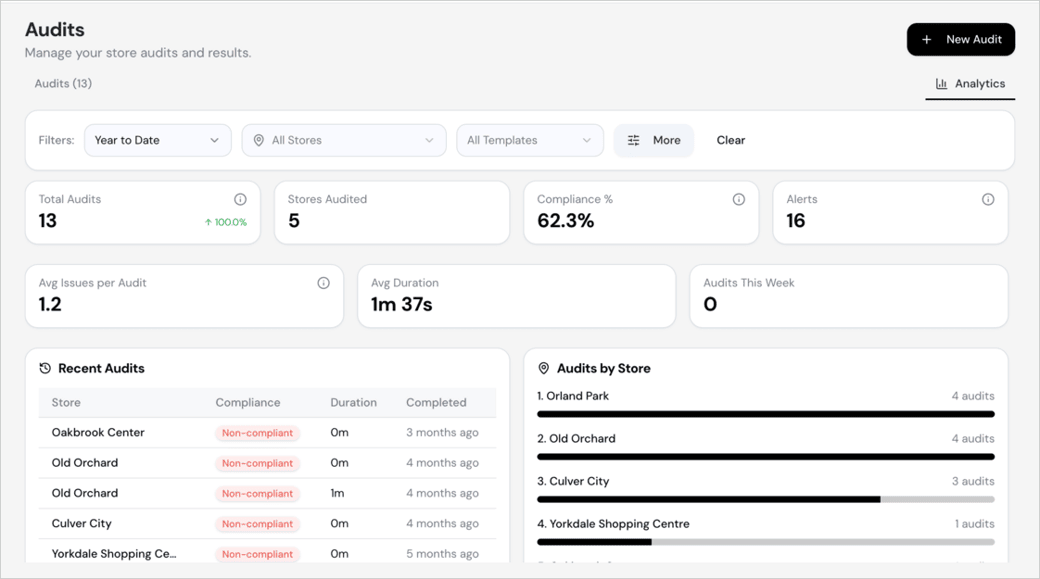
The Store Audit reporting section provides leadership with an objective, data-driven view of store performance over time. Reports are available immediately after an audit is submitted and give visibility into compliance trends, audit frequency, and time-on-site across your entire store portfolio.
What You Can See in Reporting
Historical audit results for individual stores or across all stores
Performance on a specific audit template or all templates combined
Compliance rates and recurring issues across locations
How many days since a store’s last audit
Time taken to complete each audit per store, allowing you to identify outliers
Easy Access to Bottom & Top 10 stores
Can apply advanced filters to the data by various criteria by selecting the filter toggle
Key Insights You Can Act On
Reporting is designed to surface actionable insights. Examples include:
Identifying stores that haven’t received an audit in an extended period (e.g., 50+ days)
Flagging stores where audits consistently take significantly longer than others, which may indicate operational or training gaps
Tracking improvement or regression in compliance scores over time
How to Access Reporting
Navigate to the Audit section from the left sidebar.
Select the Reporting tab within Store Audit.
Filter by store, audit template, or date range to narrow your view by selecting the "Filters" button.
Review compliance scores, audit frequency, and time data across your locations.