Admin Users: Audit Logs
Last updated: August 18, 2026
What They Are
Every change to a role, a permission, an access setting, or a location record leaves a trace — and now you can see it. Audit logs show you who changed what, when they changed it, and what it looked like before, so you're never stuck reconstructing a change from memory or asking around to find out who touched what.
Where to Find Them
You'll find the Audit Log in three places: Admin: Roles, Admin: Locations, and the Library. Wherever you're managing something, the history of changes to it is right there with it — expand the Audit Log section to see it.
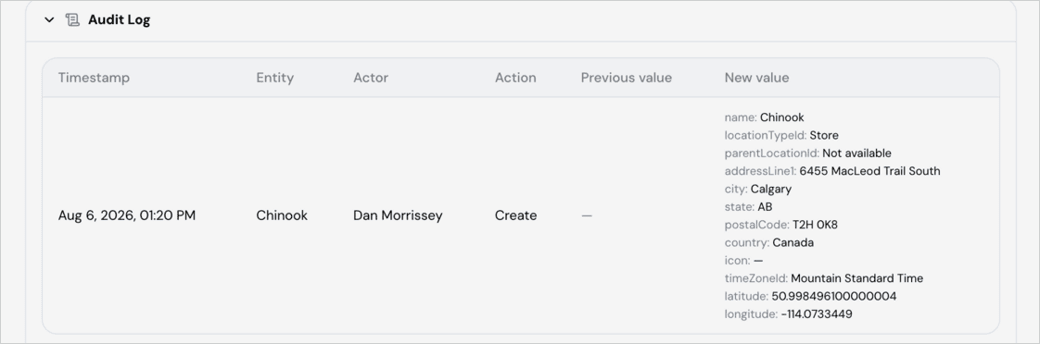
What You'll See
Each entry in the log gives you:
Timestamp — exactly when the change happened
Entity — what was changed (a location, a role, a permission)
Actor — who made the change
Action — what kind of change it was (Create, Edit, Delete, and so on)
Previous value — what it looked like before
New value — what it looked like after
For example, if you look up a location like Chinook, you might see that Dan Morrissey created it on Aug 6, 2026 at 1:20 PM — and the log lays out exactly what was entered: name, location type, address, city, state, postal code, country, time zone, and coordinates, all in one place.